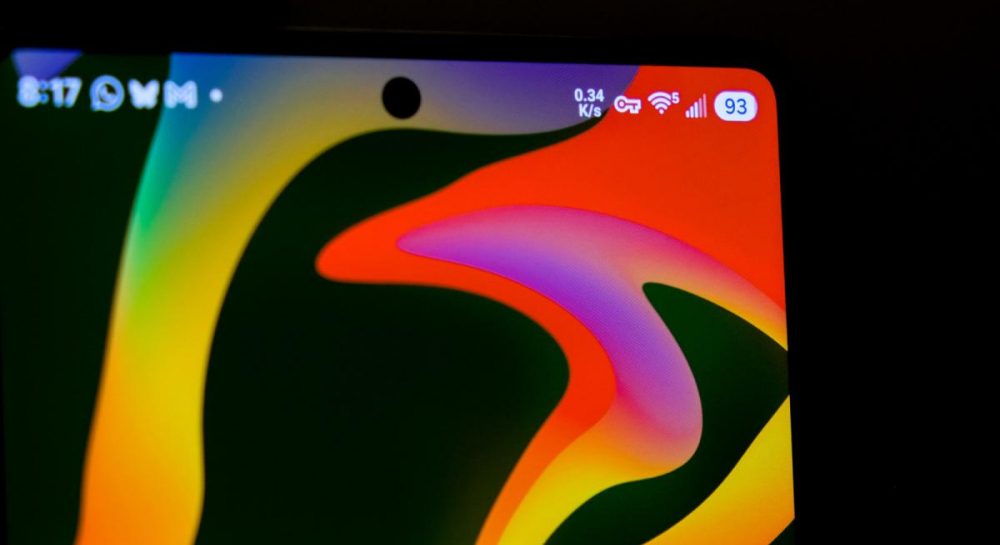
Key icon on Android screen: what this indicator means and how to remove it
Android smartphone users often notice an unfamiliar key symbol in the top panel, which actually indicates that a VPN service is running. This indicator guarantees data protection, though it can be hidden or the connection disabled if desired.
 💡Tech
Photo: UNIAN
Key points
- Key icon on Android indicates an active VPN connection
- Indicator confirms traffic encryption and data protection
- Samsung owners can hide the icon via the Good Lock app
- VPN hides IP address but does not protect against site trackers
Modern mobile devices running the Android operating system regularly display various symbols in the status bar whose purpose can be difficult to guess immediately. One such mysterious element is a miniature key icon with two prongs. As industry experts explain, this sign has nothing to do with hacks, system glitches, or viral threats. On the contrary, its appearance indicates that your smartphone is connected to a secure communication channel.
Why the icon appears and how to remove it
The main reason for this indicator to activate is an active VPN service running on the gadget. As long as the icon is present on the screen, all incoming and outgoing internet traffic passes through an encrypted connection. This means the user's real IP address is hidden from prying eyes, and personal information remains safe even when using public Wi-Fi networks, such as in city transport or cafes.
Most mobile phone manufacturers intentionally do not allow users to remove this icon in the settings so that the owner always monitors the security status. The only exception is for Samsung Galaxy device owners, who can use the proprietary Good Lock utility and its QuickStar module to customize the notification panel. In other cases, the only way to get rid of the key is to completely deactivate the VPN application in the smartphone's memory.
At the same time, specialists recommend considering the specifics of such technologies. While virtual private networks effectively mask location, they do not save users from website trackers, cookies, or account authorizations. Moreover, certain websites may perceive encrypted traffic as suspicious, leading to requests for additional security checks.
Source UNIAN — unian.ua/techno/gadgets/znachok-klyucha-u-paneli-na-android-za-shch… ↗
Read next
 🏛️Politics
Hungarian PM opposes linking EU budget to Ukraine funding
The Hungarian Prime Minister stated that financial support for Ukraine should not be tied to the approval of the European Union's long-term budget.
 🇺🇦Ukraine
Peter Magyar labels Russia an aggressor and confirms visit to Zakarpattia
Hungarian Prime Minister Peter Magyar has expressed solidarity with Ukraine and condemned Russian aggression, announcing an upcoming visit to the Zakarpattia region.
 🛡️Security
Kremlin's Latest Nuclear Threats: Medvedev Outlines Conditions for Using WMDs
Deputy Chairman of the Russian Security Council Dmitry Medvedev has again threatened Ukraine with a preemptive nuclear strike, citing hypothetical threats from NATO.
 🏛️Politics
EU Responds to Putin's Moscow Invite: Multilateral Format Remains the Priority
The European Commission acknowledges the invitation from the Kremlin but insists that any security talks must include all EU and NATO allies.
 🇺🇦Ukraine
NATO Secretary General Rejects Russian Demands to Return to 1997 Borders
Mark Rutte labeled Russia's attempts to revise the European security architecture and demand NATO troop withdrawals as unacceptable.
 🛡️Security
DTEK energy workers restore power to millions following massive attacks
Over 3.5 million families regained electricity in one week, with the Odesa region being the most affected area.